AI-powered plug-in for Adobe Photoshop
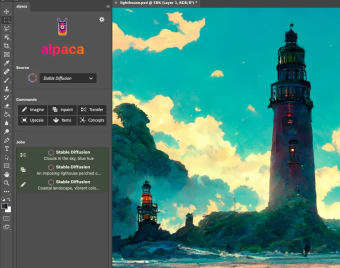
alpacaAI, also known as Alpaca, is a new AI-powered graphics tool that works as a plug-in for Adobe Photoshop. Powered by the open-source Stable Diffusion AI, it allows AI art and human graphics design skills to seamlessly combine while benefiting from the familiarity of working within the established Photoshop user interface.
Top Recommended Alternative

AI art generation is achieved through text-to-image functionality, similar to that seen within solutions like DALL·E. Among the other features provided are inpainting, upscaling, transferring, and more.
Text-to-image technology
Art and graphic design have been dramatically disrupted by the emergence of tools powered by artificial intelligence, which are able to generate artwork automatically. Alpaca, or alpacaAI, is aiming to take this to the next level by integrating this technology with Adobe Photoshop, resulting in incredible workflow improvements. alpacaAI works by generating imagery through a text-to-image feature.
Users can enter a short description of what they want the software to create, and this will then be generated. A simple user interface also allows users to scroll between multiple creations. For instance, typing "a sunny coastal scene" could result in several different options being generated, and the user can select the one that best suits their needs.
Adobe Photoshop integration
So, how does alpacaAI compare to other AI art tools? Like various other solutions, it is powered by Stable Diffusion, which is able to interpret text inputs and create images based on this understanding. Alpaca can be used to generate original images, expand existing images, upscale, intelligently fill blank spaces, and much more.
The core technology invites comparisons with tools like DALL·E. However, alpacaAI stands out because it works within Adobe Photoshop, combining both solutions for improved productivity and greater graphics design power.
Combining human and AI design
Alpaca is a plug-in for Adobe Photoshop, which makes it ideal for artists and graphic designers who already use that product in their workflow. This integration also allows human and AI art and design to combine quickly and effortlessly.
.png)